P1 · BOFU
HoneyBook alternatives after the 2025 price hike
HoneyBook raised plans 63-89% in Feb 2025. Seven alternatives by price and fit, plus slot pricing that will not double overnight.
By ClientNest365 team · Published · Updated · 7 min read
In February 2025, HoneyBook raised every published price by 63% to 89%. A customer who locked in at $19 / month on the Starter plan in 2024 woke up to a $36 / month bill, with two days' notice. Essentials went from $35 to $59 a month. Premium from $79 to $129. The increase came without a feature unlock, without a usage spike, and without renegotiation. If you signed up before the hike, you were grandfathered for a brief window, then rolled onto the new pricing on renewal.
If you're reading this, you're probably one of those customers, or you're evaluating HoneyBook fresh and want to know which side of the price-hike risk you're stepping onto. This guide walks through seven realistic alternatives, what each one costs, where each one wins, and where each one falls short.
For source pricing and feature breakdowns we lean on the client portal cost guide and the 11-feature checklist, both refreshed May 2026.
Why this matters more than a typical "alternatives" post
HoneyBook is a category leader in the service-business CRM and client-portal space, especially among US creatives. Their pricing change is the most visible recent signal that "subscription locked-in" carries a real risk: the vendor can change the price at any time, and you have weeks to either pay or migrate. Migration costs are not zero. Most users pay.
The seven alternatives below are evaluated on:
- Floor price in month 1
- Realistic in-use price at month 6 (with the upgrade you'll likely need)
- Pricing-model risk (subscription, slot-based, annual lock-in)
- Migration friction from HoneyBook (export options, data mapping)
- The capability gap vs HoneyBook's strongest features
1. SuiteDash
Entry price: $19 / mo (Start). Realistic in-use: $19-49 / mo. Source: suitedash.com/pricing.
SuiteDash is the most direct subscription competitor by price floor. The Start plan at $19 / mo includes unlimited staff, unlimited portals, unlimited CRM contacts, 100 GB storage, and a custom-branded mobile app. White-labeling is more aggressive than HoneyBook's at the same price point.
Where it wins vs HoneyBook: lower entry, far stronger white-label out of the box, unlimited team members.
Where it loses: steeper learning curve. SuiteDash covers CRM + portal + invoicing + scheduling + project management in one product, and configuration decisions cascade. Plan a week, not an afternoon, for the migration.
Full breakdown in SuiteDash alternatives if SuiteDash itself isn't the right shape either.
2. Dubsado
Entry price: $335 / yr (~$28 / mo Starter). Realistic in-use: $44-60 / mo on Premier. Source: dubsado.com/pricing.
Dubsado is the closest spiritual sibling to HoneyBook: workflow-and-form-builder, creative-skewed, similar plan structure. Premier (the "actually functional" tier) lands at ~$44 / mo annually, comparable to HoneyBook's pre-hike Premium.
Where it wins: automation builder is more flexible than HoneyBook's, and the 21-day full-Premier trial is a real evaluation, not a Starter teaser.
Where it loses: the visual brand reads 2018-era. Onboarding is dense. Starter is heavily capped (one lead-capture form), so most working firms end up on Premier within a month.
Detailed at Dubsado alternatives.
3. Copilot
Entry price: $59 / mo (Starter). Realistic in-use: $189 / mo (Professional with AI). Source: copilot.com/pricing.
Copilot is the polish play. Visually the closest portal in the space to Notion or Linear. White-label, clean message threads, AI Assistant bundled into Professional.
Where it wins: the client-side experience is genuinely premium. If your buyers are corporate-side professionals (accountants, lawyers, consultants), Copilot signals competence in a way HoneyBook's wedding-photographer-skewed brand doesn't.
Where it loses: Starter at $59 is the highest entry in the segment, and you need Professional ($189) to get AI. No EU-region data hosting. Migration friction is high because HoneyBook's data export is CSV-shaped and Copilot's data model is workspace-shaped.
4. Moxo
Entry price: $0 (Free) or $99 / mo (Business). Realistic in-use: $99 / mo. Source: moxo.com/pricing.
Moxo is the workflow-and-AI-first play, targeted at multi-stakeholder operations (accounting, financial advisory). The Free tier is genuinely free, with two flows and 500 AI credits. The jump to Business at $99 is steep but the tier is full-featured.
Where it wins: real free tier (you can run an actual portal at $0), advanced AI in higher tiers, on-prem option at Enterprise.
Where it loses: the "flow quota" model creates unpredictable upgrade pressure (use an 11th flow, jump tiers). Brand recognition is lower than HoneyBook outside enterprise circles.
5. ClientNest365 (per-client model, not subscription)
Entry price: $15 one-off (3 client slots). Realistic in-use: $15-$75 / year for boutique firms; $300 or more a year at scale.
This is our product, named for transparency. It's the alternative for HoneyBook customers whose objection is "I don't want a subscription that can be repriced." You buy client slots in packs: $15 for 3 clients, $35 for 10, $75 for 25, $150 for 50, $300 for 100. The slots don't expire. There's no monthly fee.
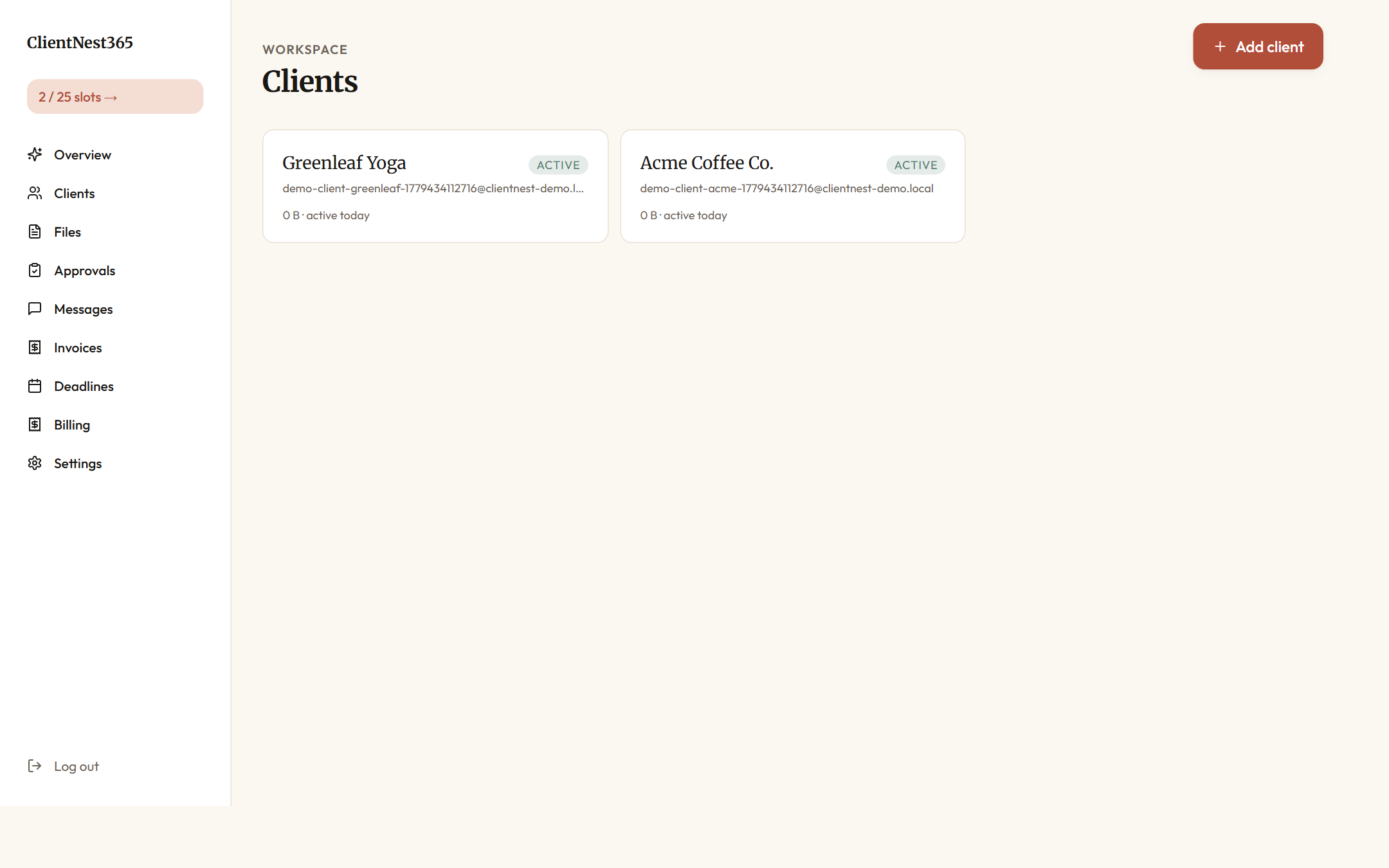
The product includes all 11 features from the features guide: per-client workspaces, magic-link auth, versioned files, approvals as objects, in-portal invoicing, scoped messaging, deadline tracking, audit trail, white-label branding, mobile-first interface, and an AI concierge grounded in the client's actual data.
Where it wins vs HoneyBook: no subscription, no annual lock-in, no risk of overnight repricing. White-label is included, not gated to the top tier.
Where it loses: newer to market, smaller community. No accounting-software integrations yet (QuickBooks Online integration is roadmapped). If your firm is HoneyBook-deep with five years of templates, the migration cost is real.
If the per-client model fits, open a free 3-client workspace for $15.
6. Notion + Stripe + DocuSign (the DIY stack)
Entry price: ~$12 / mo (Notion Plus) + Stripe per-transaction + DocuSign $15 / mo. Realistic in-use: ~$40-60 / mo combined.
The build-it-yourself answer. Notion handles the document workspace, Stripe handles billing, DocuSign handles signatures. You wire them together with Zapier or by hand.
Where it wins: maximum customization, lowest floor cost, no vendor lock-in.
Where it loses: you are now the integrator. Onboarding a client takes 30+ minutes of setup. There's no unified audit trail. The client experiences three logins, not one. The client portal vs file-sharing guide covers this trade-off in depth.
7. Staying on HoneyBook (the honest seventh option)
Entry price: $29 / mo annual ($36 monthly). Realistic in-use: $109-129 / mo (Premium).
Worth saying: if your firm is heavily integrated with HoneyBook templates and your client volume is steady, the migration cost may exceed the price-hike pain. HoneyBook's Premium tier at $129 / mo with unlimited team and brands is genuinely competitive. The 2025 hike was painful but the post-hike pricing is roughly market-standard.
Where staying makes sense: you're already on Premium, your templates are five years deep, your team is HoneyBook-fluent, and your churn risk is low.
Where it doesn't: you're on Starter or Essentials and the price-to-value ratio just doubled overnight. Migrate before renewal.
Quick decision matrix
| If your priority is... | The right answer is... |
|---|---|
| Lowest sticker price | SuiteDash Start ($19 / mo) |
| Most premium client-side UX | Copilot Professional |
| No subscription, ever | ClientNest365 (per-client) |
| HoneyBook-shaped workflow, different brand | Dubsado Premier |
| Free start with paid scale | Moxo Free → Business |
| Build-your-own | Notion + Stripe + DocuSign |
Migration practicalities
Three things to do before you flip:
- Export everything from HoneyBook. Settings → Account → Export. You get a CSV per object (projects, clients, invoices, payments). Save this even if you're staying; it's your audit insurance.
- Run two weeks in parallel. Don't move all clients at once. Pick the three most patient ones, set up portals in the new tool, see how they react. Iterate on the welcome message and folder structure before the bulk migration.
- Notify clients with a real reason. "We're moving to a new portal that better fits our practice" reads as forward motion. "HoneyBook raised our bill so we're changing tools" reads as cost-cutting. Both are honest. Pick the framing that matches your firm.
What to read next
- If you're new to the category: what is a client portal? is the plain-English explainer.
- If you want a feature-by-feature comparison instead of a vendor-by-vendor one: the 11 features every modern client portal needs in 2026.
- If you're not sure a portal pays off at all: is a client portal worth it? ROI math for small service firms.
- If you're an accountant: the dedicated accounting vertical guide covers tax-season patterns, deadline tracking, and document-classification workflows that HoneyBook doesn't natively support.
For a free 3-client workspace with no subscription, open one here. It costs $15, the slots don't expire, and you can compare side-by-side against any of the seven options above.