Agencies and studios · MOFU
Agency walkthrough: client portal for design agencies
How a 5-person brand identity agency replaces HoneyBook + Slack + Drive with one client portal: design approvals, retainer messaging, white-label branding, real screenshots.
By ClientNest365 team · Published · 15 min read

About this walkthrough: Forge Studio is a composite agency. The agency name and team members are illustrative; the workflow, costs, and product behaviour are accurate as of mid-2026. Every screenshot below is from the live product, captured on a freshly seeded demo workspace. We'll publish named case studies as real customers consent to being featured.
The studio
Forge Studio is a 5-person brand identity agency in Lisbon, founded in 2021. The team:
- 2 founders (creative director, strategy director)
- 2 senior designers
- 1 part-time client lead
They run about 8-12 active client engagements at any time, with engagements lasting 6-14 weeks. Typical client: a Series A startup or established consumer brand needing a logo system, brand guidelines, and a basic web presence. Average engagement size: €18K-€45K.
The studio is profitable, growing 25% year over year, and the founders are protective of the calendar. They lose two evenings a week to "where's that PDF?" and "did the client approve V3?" before adopting a portal.
What they had before
Forge Studio's stack in early 2026, common for design agencies of this size:
| Tool | Purpose | Cost (2026) |
|---|---|---|
| HoneyBook Premium | Client management, proposals, invoicing, contracts | €129/month = €1,548/year |
| Slack (free) | Internal + Slack Connect with clients | €0 |
| WeTransfer Premium | Sending large design files | €120/year |
| Google Drive (Workspace) | Working files + client deliverables | bundled with Workspace |
| DocuSign Personal | Engagement letters | €120/year |
| Stripe | Payments | 1.5% + 0.25 per transaction |
| Figma | Design + light client review | included in team Figma |
| Linear | Internal project tracking | bundled |
HoneyBook handled the most client-facing work: clients had a HoneyBook portal where they signed proposals, paid invoices, and saw a project timeline. But the design files lived in Drive, the conversations lived in Slack Connect, and the brand book PDFs went through WeTransfer because Drive's file sharing felt clunky for large clients.
HoneyBook's 89% price hike in February 2025 (Starter went from $19 to $36/month, Premium from $79 to $129) sat badly with the founders. They paid for the year because they couldn't migrate mid-project, but they started looking for alternatives in early 2026.
The other pain point: Slack Connect was a disaster for non-tech clients. The CEO of a wine importer client (one of their best engagements) refused to use Slack at all. He emailed PDFs, which a designer had to upload to Drive, which then needed a link to Slack Connect for the team. Each round of design review took 4-6 days because someone had to broker the file movement.
The studio looked at three alternatives before settling:
| Tool | Pricing (2026) | What stopped them |
|---|---|---|
| Dubsado Premier | $499/year (€472) | Better than HoneyBook but still subscription model; UI felt aimed at coaches more than design studios |
| Copilot | $389/month Pro plan | Strong feature fit; price destroyed the math |
| ClientNest365 | €75 one-off for 25 client slots, no subscription | Pricing per client matched their engagement cadence (8-12 clients × 2 yearly turnover ≈ 20 client slots per year) |
The math the strategy director presented:
- HoneyBook 2026 cost: €1,548
- ClientNest365 cost for 24 clients per year: €75 × 1 (25-pack covers a year with 1 slot to spare) + €10 branding pack = €85
- Saving: €1,463/year, or about three months of one part-time hire
The founders authorized the switch. They migrated their three newest engagements first, kept three existing engagements on HoneyBook through completion, and finished migration by end of April 2026.
The workspace overview
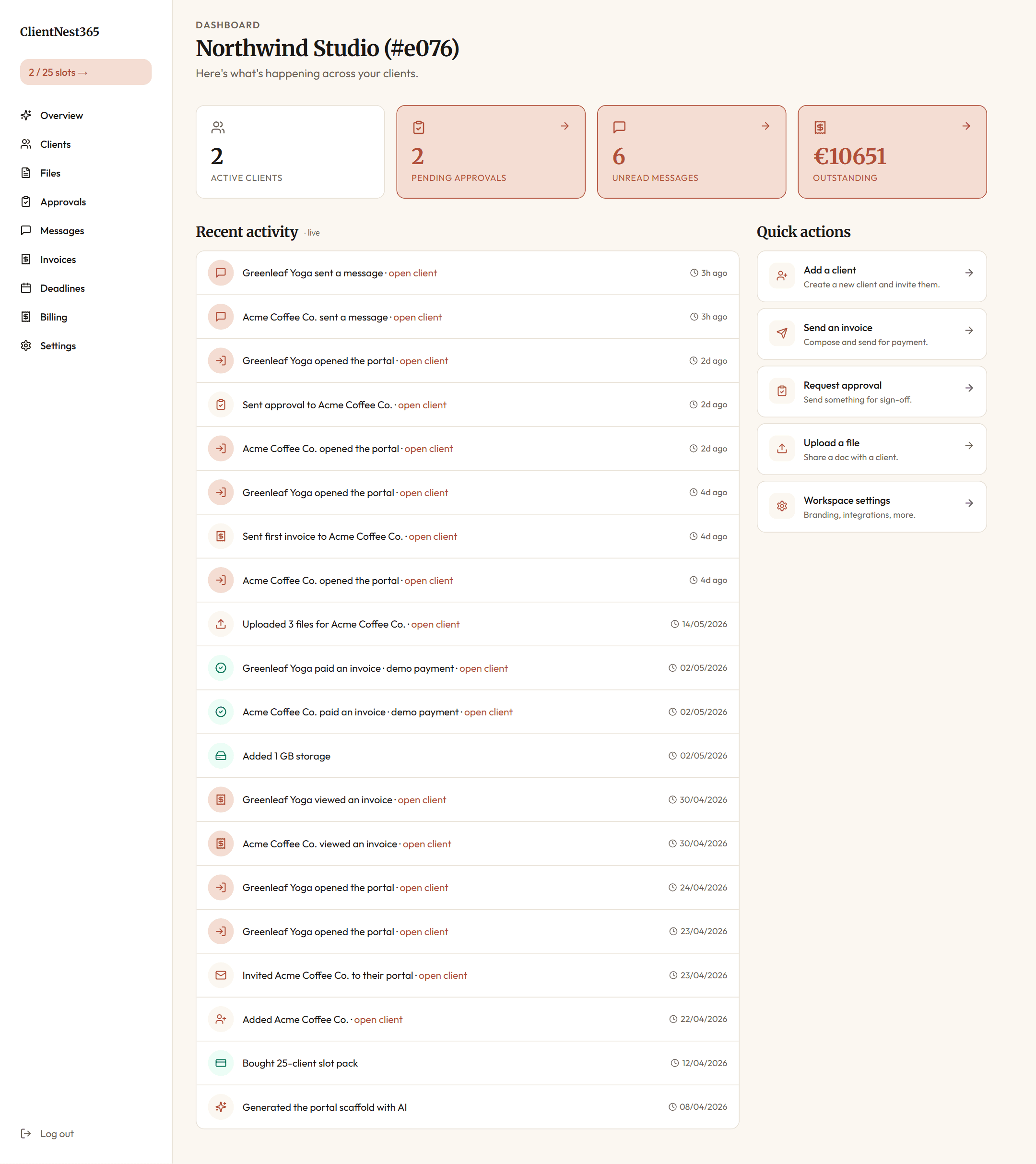
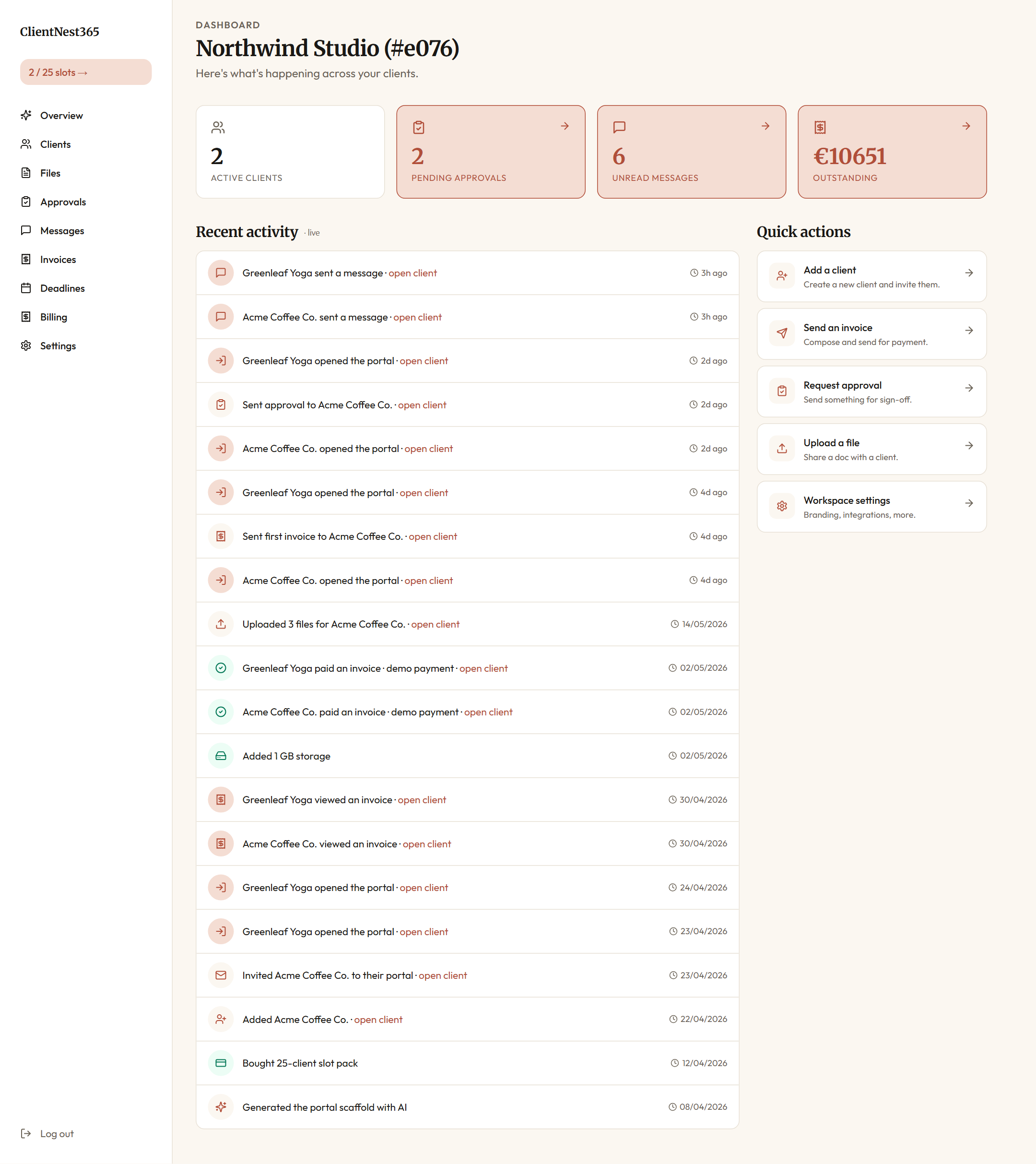
The first thing a Forge Studio team member sees after login is the workspace overview. It collapses every active engagement into four numbers and a live activity feed.

The four cards across the top:
- Active clients, open engagements (slot-pack consumption is visible in the top-left "2 / 25 slots" pill).
- Pending approvals, anything the team is waiting on a client to sign off.
- Unread messages, messages from clients the team hasn't replied to.
- Outstanding, invoices sent but not yet paid.
The recent-activity feed below shows every event in the workspace, newest first: messages sent, portals opened, approvals decided, invoices viewed, files uploaded. Each row links to the relevant client so a partner can jump straight into context. This is what the creative director checks first thing every morning instead of triaging email.
The clients list
The clients list at /app/clients is the rolodex. One row per engagement, with the contact email and the slug used for portal links.

A new client takes two fields (name + primary email) and one click to "send magic-link invite now." That fires an email through Resend with a one-time token. The client clicks once, lands inside their portal, no password to set.
Setting up the workspace
The studio set this up by running the configurator on day one. The four questions are deliberately concrete:
- What service do you sell?
- "Brand identity design: logo systems, brand guidelines, basic web presence"
- Who is your typical client?
- "Series A startups and established consumer brands, founder or marketing-lead as primary contact"
- What deliverables do you share?
- "Logo concepts, brand guideline PDF, design files, source assets (Figma, Illustrator), brand voice document"
- What approvals do you need?
- "Concept selection at week 2, final logo at week 4, full guideline sign-off at week 8"
The Kie.ai-powered scaffolder built a portal structure tuned for design work: folders for Concept exploration, Selected direction, Brand guidelines, Source files, Invoices. A welcome message addressed to the client. Six message templates ("Quick check-in", "V1 ready for review", "Closing the engagement", etc.). The creative director spent fifteen minutes editing the welcome message and reordering the folders, then activated it.
The agency-vertical features they enabled:
- Per-client branding (€10 add-on, one-time): each client portal gets its own logo, accent colour, and display name. The wine importer's portal opens in their warm-red. The fintech client's portal opens in their navy. The agency name is barely visible.
- Approval-as-object workflow: every concept presentation becomes a structured approval with timestamp + comment threading.
- Outbound webhooks: configured to fire
invoice.paidto a Slack channel (internal team awareness) andfile.uploadedto a backup Make.com scenario that copies new client uploads to a Drive archive.
A typical engagement, week by week
Forge Studio's engagements run a predictable 8-week cadence. Here's how it looks inside ClientNest365.
Week 0: kickoff
The strategy director creates the client in the workspace and ticks "send the magic-link invite right now." The Vintura founder gets an email from noreply@clientnest365.com:
Forge Studio set up your private portal. Inside, you'll find shared files, approval requests, messages, and invoices. Open your portal.
The founder clicks. They land in a portal branded "Forge Studio · Vintura". Here's what that landing screen looks like:

The four stat cards mirror the agency-side ones but framed from the client's perspective. "Pending approvals" tells them what's waiting on their decision. "Files requested" tells them what to upload. The activity feed below shows what's happened on this engagement, from their side and the agency's side, in one timeline.
The footer card ("Your portal is private") is deliberate. Most clients haven't used a portal before. The first impression is "is this safe? who else can see this?" The privacy card answers it before they ask.
The engagement letter is the first action. Carla reads it in-browser, clicks Approve at the bottom, the signature is logged with timestamp and IP. The studio gets a notification through the webhook into Slack.
The first invoice (50% deposit, €15,000) lives in the Invoices section. Carla pays via the portal's payment provider link. The webhook fires invoice.paid to the Slack channel. Stripe sends the deposit minus 1.5%.
The approval loop, agency side
Once the engagement is running, the heart of the workflow is the approvals view. Every concept, every revision, every final lock lives here as a structured object, not an email thread.

Each pending decision shows:
- the client it belongs to,
- the title (so the partner remembers the context without opening it),
- when it was sent and when it's due,
- the mode (any reviewer, specific reviewer, all reviewers).
The New approval button in the top right is what the designer clicks at the end of each round. Subject line, optional body, attached files, due date, mode. Six seconds to send.
The approval loop, client side
From the Vintura founder's perspective, the same approval looks like this:

One click into a row and the PDF preview opens inline, with Approve and Request changes buttons at the bottom. Approval gets timestamped with the client's IP and session. Request-changes opens a comment field that posts back to the studio. No download required, no DocuSign seat, no email loop.
Week 2: concept review
The senior designer uploads three logo concept directions as PDFs to the Files section. Each PDF is 12-30MB. The portal's R2-backed storage handles the upload through a presigned URL; the file appears in Carla's portal within seconds.
Here's the agency-side files view after the upload:

And the same files as Carla sees them in her portal:

The designer also creates an approval request in the portal:
Subject: Logo concept direction Body: Three concept directions attached. Please pick a preferred direction by end of next week, with comments on what's resonating and what's not. We'll develop the chosen direction in Round 2. Files attached: 01-direction-mark.pdf, 02-direction-wordmark.pdf, 03-direction-symbol.pdf
Carla gets an email pointing to the approval. She opens the portal, reviews each PDF in-browser (PDF preview is built in, no download required), and clicks Request changes with a comment:
I'm drawn to direction 2 (wordmark) but the W feels too geometric for our brand voice. Can you explore something more like direction 3's energy but applied to a wordmark? Direction 1 isn't for us. Thanks team.
The studio gets the notification. The approval is now logged as "in revision" with Carla's comment attached. The designer iterates and uploads V2 within three days.
The whole loop, end to end, took 6 days from concept upload to selected direction. In the HoneyBook + Slack + Drive flow, the same loop typically took 10-14 days because the file delivery and comment loop crossed three tools.
Messages, scoped per client
Forge Studio uses messages for everything that's faster than an approval but more important than a Slack DM. Each client has their own message thread; the studio's side sees every thread aggregated:

The client sees only their own thread:

The thread is real time. When the client types, the studio sees a typing indicator. When the studio replies, the client sees it without refreshing. Both sides have read receipts. No more "did you see my email from Tuesday?"
Week 4: final logo approval
After two rounds of refinement, the agreed direction is locked. The senior designer uploads the final logo system (15 SVG files, brand guideline excerpt, application examples) and creates a sign-off approval:
Subject: Final logo system, ready for sign-off Body: Carla, this is the final mark, in all weights and applications. Approving here locks the direction. We'll move to brand guideline development next week.
Carla approves. The approval is logged. The file lock prevents further edits. The webhook fires approval.decided into Slack with the workspace's Slack Connect channel: "Vintura signed off on final logo system."
Week 7: brand guidelines delivery
The senior designer uploads the 84-page brand guideline PDF. The portal's PDF preview renders pages 1-3 in the file card; full preview opens on click. Vintura's marketing lead opens it on her phone (the portal is fully responsive), reads through during her commute, and adds a comment to the approval:
Pages 28-31 (voice and tone) are perfect. Page 47 (logo on photography) has one example I'd push back on, the photo of the bottle on concrete feels off-brand. Can we get one more example for that page?
The designer addresses it, swaps the example, uploads V2 of the guideline. Carla approves the final.
Week 8: closing the engagement, invoicing
Final invoice (remaining 50% = €15,000) is generated from the workspace. The agency's invoices view shows the full ledger across clients:

The three cards at the top (Outstanding, Paid, Drafts) are the cashflow snapshot a partner checks on Monday mornings. The list below is filterable (All, Drafts, Sent, Viewed, Paid, Overdue). New invoice via the button in the top right opens a builder.
The Vintura founder pays through her portal:

Total time inside the portal during the 8-week engagement: about 12 hours of creative-director time, mostly responding to comments and generating invoices. Compared with HoneyBook + Slack + Drive: roughly 20-26 hours per engagement, mostly broker time moving files between tools.
The AI helper
Each client portal has an AI helper that answers questions about that specific engagement.

The model (Claude Haiku via Kie.ai) runs against the client's actual state: their files, their pending approvals, their upcoming deadlines, their invoices. It cites the specific items it pulled from when it answers, so it doesn't hallucinate.
For a wine importer who doesn't speak fluent product-management, this is the difference between "I'll email Carla to ask" and "I'll just ask the portal." Five questions per engagement, on average. Each costs about €0.02 in API credits.
The pricing details
Forge Studio's annual ClientNest365 spend at their current cadence (24 engagements/year):
- Two 25-client packs: €75 each = €150/year
- Branding pack: €10 one-off (year 1 only)
- First year total: €160
- Renewal years: €150
The studio can see exactly what they've bought in their billing page:

Compared with the alternatives at the same volume:
| Tool | Annual cost |
|---|---|
| HoneyBook Premium (2026) | €1,548 |
| Dubsado Premier (2026) | €472 |
| Copilot Pro (2026) | €4,668 (€389/mo × 12) |
| ClientNest365 | €150/year |
Saving versus their previous HoneyBook spend: €1,398/year. The strategy director's note in their Q1 review:
"We swapped a subscription that was scaling with HoneyBook's pricing decisions for a slot model that scales with our actual client volume. The math is straightforward."
Workspace settings
Branding, integrations, webhooks, and team member permissions live in one place:

The branding section is where Forge Studio set their warm-clay accent and uploaded their logo. The webhook endpoints below let them route events to Slack, Make.com, and a backup Drive sync. Custom domain (portal.forgestudio.io in their case) is a €20 one-off.
The outcome
Forge Studio's March 2027 internal review tracked these changes from the previous year:
- Average engagement turnaround: 7.5 weeks (was 9 weeks in 2025), about 20% faster
- Approval cycle time per round: 2.4 days (was 5.1 days), design feedback now arrives in days, not weeks
- Tool spend on client communication: €160/year (was €1,548 + €120 + €120 = €1,788), saved €1,628
- Hours spent re-uploading files between tools: near zero (was an estimated 6 hours/week across the team)
- Client portal satisfaction: the wine importer founder, who refused to use Slack, called the portal "the first time I've felt I knew what was happening with my agency"
- New engagements declined due to capacity: 2 (was 4), the saved time enabled accepting two more engagements
The studio also noticed an unexpected effect: clients started referring more business. The branded per-client portal gave their clients something concrete to point at when colleagues asked who did their brand. Word-of-mouth referrals jumped from 4 in 2025 to 9 in 2026.
The white-label branding moment
This is the feature the founders weren't expecting to value but ended up promoting.
For €10 one-off, each client portal gets:
- A different logo in the header (the client's logo, not Forge Studio's)
- A different accent colour (matched to the client's brand)
- A different display name in the portal title bar
- A different welcome message addressed to the client
From the client's experience, they're using "Vintura's portal" or "Aldon's portal", not "Forge Studio's portal that happens to host my work." The agency identity is present but subtle. The client feels like the relationship is bespoke.
The wine importer (the Slack refusenik) bragged about "his digital workspace with the agency" at a wine industry dinner. The marketing director of a furniture retailer overheard, asked who built it, and became a referral. That referral is now a €38K engagement starting Q2 2027.
Cross-tool comparison
If you've used HoneyBook, Dubsado, or Copilot, here's how the workflows map:
- HoneyBook's project pipeline = ClientNest365's
/app/clientslist. ClientNest365 doesn't have a Kanban view; the workspace assumes engagements are linear with clear phases. - HoneyBook's invoice + scheduling = ClientNest365's invoice builder in
/app/invoices. No scheduling component (use Cal.com or Calendly via a portal link). The Pay button on a portal-side invoice goes through your chosen payment provider. - HoneyBook's contract templates = ClientNest365's approval workflows. Engagement letters are an approval request with a PDF attached; client signs by clicking Approve in the portal.
- Slack Connect = portal messages. Messages are scoped per client, threaded by subject. Real-time updates via Supabase Realtime.
- WeTransfer Premium = portal file upload via R2 presigned URLs. Limit per file: 5 GB. Suitable for raw video, large Figma exports, design master files.
- Drive folder per client = portal files panel, organized into folders the configurator scaffolded for design work.
- DocuSign = portal-native signing via approval workflow. No third-party seat needed; signing happens inside the portal session.
What ClientNest365 doesn't try to replace: Figma (still where design happens), Linear (still where internal tickets live), Notion (still where the team wiki sits). It replaces the client-facing layer: portal, files, approvals, invoices, messages.
Try the same setup
Open a workspace for €15. The four-question configurator picks the agency profile automatically when you mention "design", "brand", or "creative" in your service description. The branding pack is the Add custom branding option in your workspace settings.
If you're paying for HoneyBook today, the pricing page shows what your spend would be at our slot-based model. For most agency volumes, ClientNest365 is 80-90% cheaper.
If you want to see what an agency-specific portal looks like, the for agencies page walks through the design proof workflow, retainer management patterns, and white-label setup in more depth.