ClientNest365ClientNest365

Accounting firms · MOFU

Tax season walkthrough: client portal for accountants

How a 4-partner UK accountancy firm runs January self-assessment without chasing receipts: monthly checklists, deadline tracker, audited sign-off, 12+ real screenshots.

By ClientNest365 team · Published · 15 min read

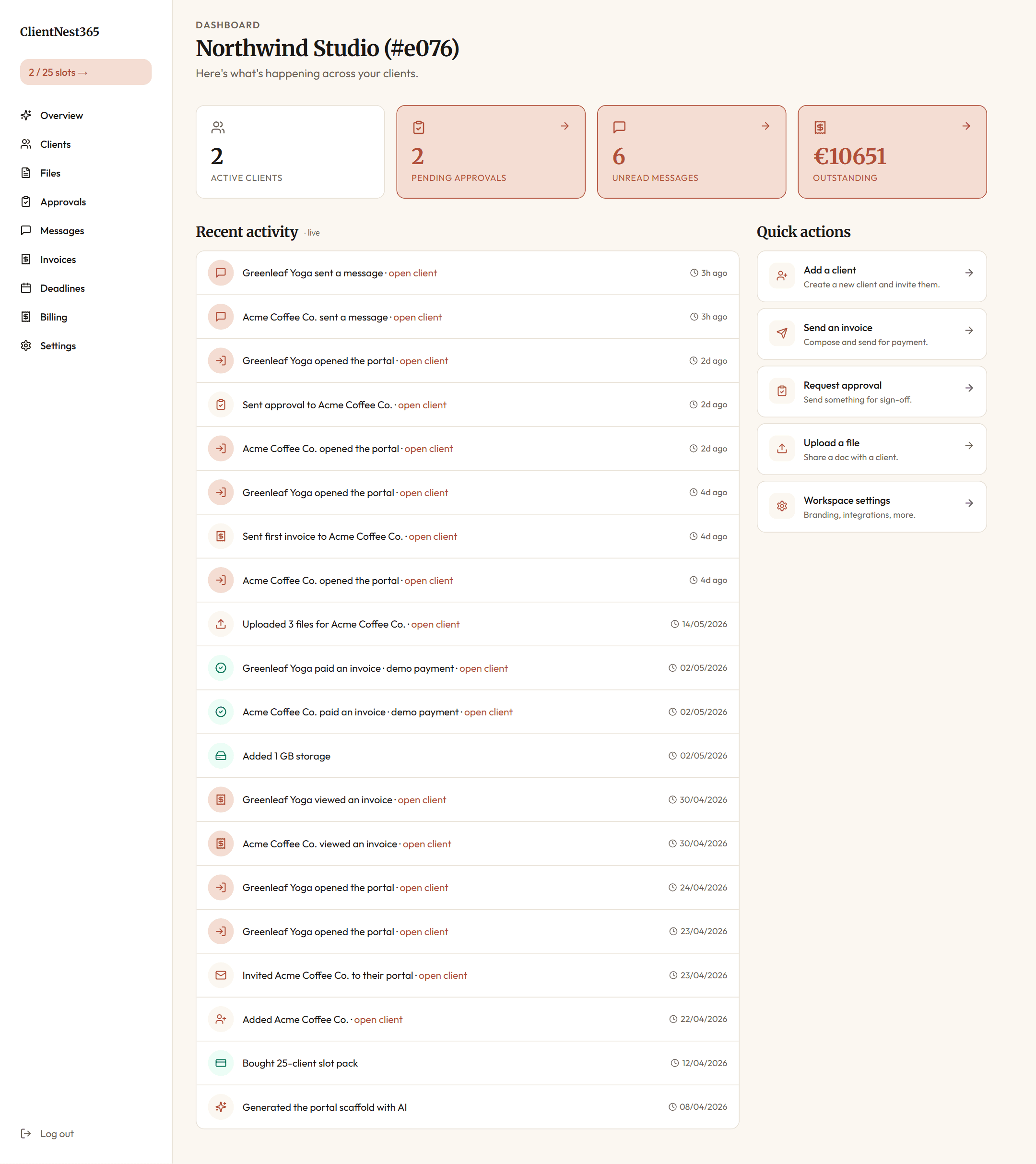
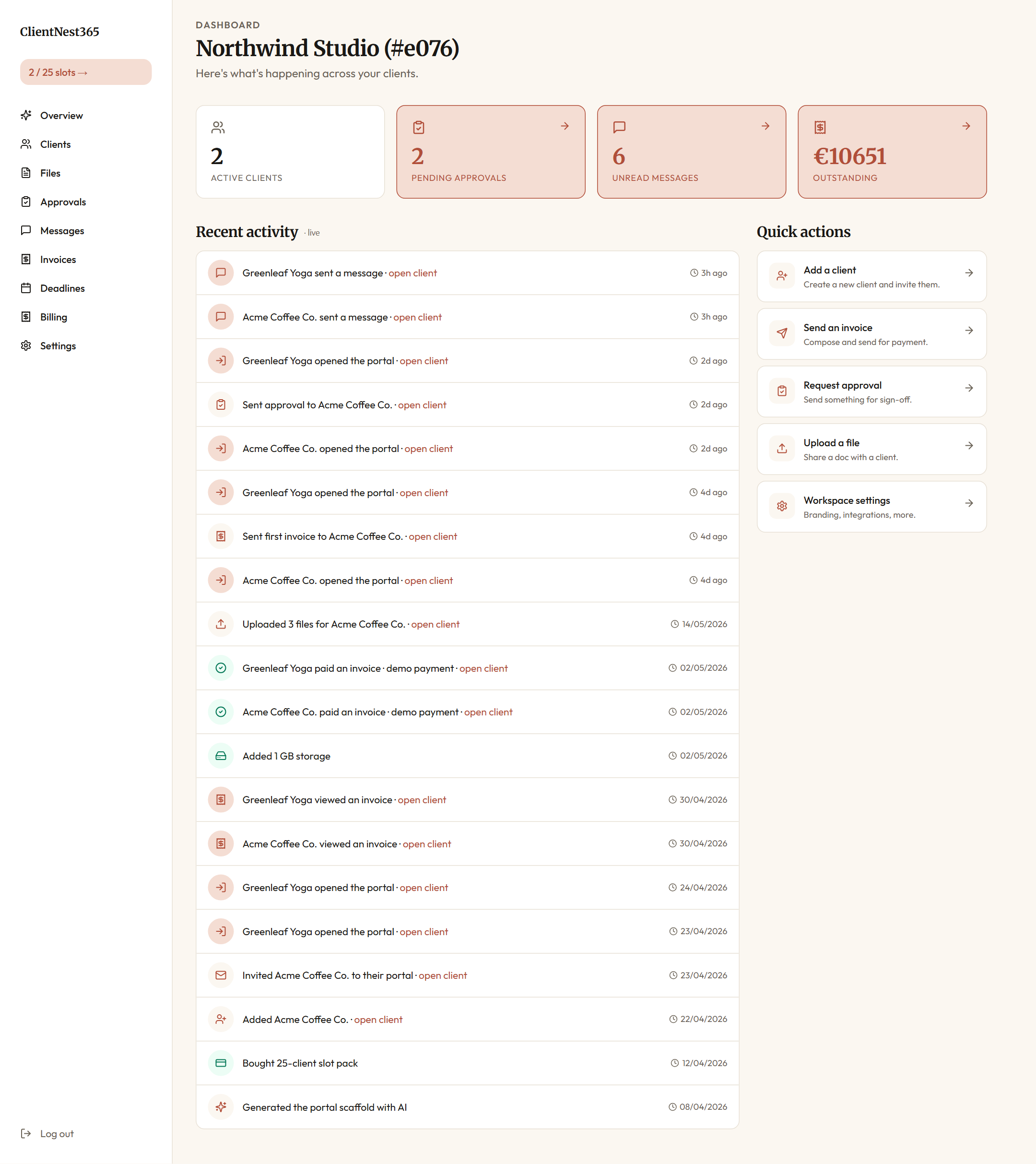
ClientNest365 workspace overview: active clients, pending approvals, unread messages, outstanding invoices, and a live activity feed of every recent event

About this walkthrough: Hayes & Co. is a composite firm. We built it from interviews and patterns we've seen across UK and Irish practices. The workflow, costs, and decisions described below are real product behaviour; the names are illustrative. Every screenshot below is from the live product, captured on a freshly seeded demo workspace. We'll publish named case studies as real customers consent to being featured.

The firm

Hayes & Co. is a 4-partner accountancy practice based in Bristol with six staff. They serve about 180 clients across two segments:

  • 130 self-assessment clients (sole traders, landlords, contractors)
  • 50 limited company clients (small businesses, retail, consultancies, two regulated firms)

Annual revenue sits around £1.4M. Tax season runs from late December through the end of January, with a quieter spike around quarterly VAT and annual accounts filing. The two partners who deal with self-assessment lose six full weeks each January to chasing documents.

In 2025 that lost time cost them about £52K in displaced billable work, plus a partner-level dispute over how much of that to push back into client fees. They started looking for a portal tool in March 2026.

What they had before

The stack at Hayes & Co. in early 2026 was typical for a UK boutique practice:

  • Email, the primary channel. Clients send attachments, partners reply with PDFs, and the inbox becomes the search index for everything.
  • Dropbox Business, shared folders organized by client, then by tax year. Clients with the Dropbox app upload here; clients without it email files which a junior re-uploads.
  • Excel deadline tracker, a single workbook on a shared drive, updated by hand. Partners check it once a week.
  • DocuSign, for engagement letter signing and final return sign-off.
  • Xero / FreeAgent / Sage, depending on the client. Bookkeeping data lives there.
  • Stripe + manual invoices, invoices generated in Xero, paid via Stripe link, manually reconciled.
  • WhatsApp, for the eight clients who only respond to text messages.

Each tool works in isolation. The problem is the gaps between them.

A typical January day looked like this: a partner opens a self-assessment client folder in Dropbox, sees they're missing a P60 and last year's bank statements, opens email to find when they last asked, types a follow-up email by hand, opens the Excel tracker to note the chase, and switches to WhatsApp for the same client's spouse who handles the property bookkeeping. Each client is fifteen minutes of context switching before any actual work starts.

Multiplied by 130 clients across six weeks, the partners worked weekends through most of January.

Why they looked at a client portal for accountants in tax season

Hayes & Co. evaluated four tools in March 2026:

Tool Pricing as of March 2026 What stopped them
Karbon $59/user/month, 10 user minimum = $5,900/year Practice-management overkill; they don't want their internal Trello replaced
TaxDome $800/year base + per-user add-ons Strong feature fit; price acceptable; UI felt heavy and "American" for a UK firm
AccountancyManager £95/month base + £15/user UK-focused; clients reported the portal felt dated
ClientNest365 €75 one-off for 25 client slots, no monthly fee Pricing model fit a partnership without W2 staff economics. Per-client, not per-seat.

The partner running the evaluation, who handles self-assessment, made the case in their April quarterly review: at 180 clients, they'd need to buy a 100-client pack (€300) plus refill twice a year as the book grew. Total: ~€600/year. Compared with TaxDome at $800/year and AccountancyManager at over £1,800/year, the slot model paid for itself before the second VAT return.

They bought the €300 pack (100 clients) plus a €75 top-up the same day, configured the workspace through ClientNest365's four-question wizard, and started onboarding clients in early October, about ten weeks before the January peak.

The first thing the partners see each morning

After login, every Hayes & Co. team member lands on the workspace overview. It's the partner morning-coffee dashboard.

ClientNest365 accounting workspace overview: 2 active clients, 2 pending approvals, 6 unread messages, €10,651 outstanding, with a live activity feed of every client event

The four cards are calibrated for partner attention:

  • Active clients matches the slot-pack consumption in the top-left pill ("2 / 25 slots" in this seeded demo, but Hayes & Co. runs at "162 / 175 slots" in real life).
  • Pending approvals is the most-watched number during tax season. Each pending decision is a draft return waiting for client sign-off before filing.
  • Unread messages counts inbound questions across all clients.
  • Outstanding is the live cashflow number, generated from the invoices table, not entered by hand.

The activity feed below is the part that replaced the partners' WhatsApp + Slack + Excel-tracker triage. Every event in the workspace, including portal opens, file uploads, invoice payments, approval decisions, lands here in real time. A partner can scan it in 30 seconds before the first client call.

The clients list

The clients list is where new self-assessment clients get added. Two fields plus one click sends a magic-link invite.

ClientNest365 clients list with two client cards: Acme Coffee Co. and Greenleaf Yoga, each with a primary email and slug

For Hayes & Co.'s bulk onboarding (the 130-client October push), they used the CSV import option from the same screen.

Setting up the workspace

After signing up, the senior partner walked through the four-question configurator. The questions are deliberately concrete:

  1. What service do you sell?
    • "Accountancy and tax for UK sole traders and small companies"
  2. Who is your typical client?
    • "Contractors, landlords, small Ltd companies with under £500K turnover"
  3. What deliverables do you share?
    • "Annual accounts, CT600 returns, SA100 returns, monthly bookkeeping, VAT returns"
  4. What approvals do you need?
    • "Sign-off on final returns before filing, engagement letter at start of relationship"

The AI configurator (Kie.ai with Claude Haiku underneath) generated a portal scaffold tuned for the accounting use case: folder structure, onboarding checklist, message templates, and an FAQ block. The partner spent twenty minutes editing the welcome message and approving the folder names, then moved on.

ClientNest365 ships with a built-in accounting pack: four checklist templates covering monthly bookkeeping (6 items), quarterly VAT (5 items), annual self-assessment (7 items), and year-end corporation tax (5 items). The senior partner clicked Install accounting pack once and all four templates appeared, editable per client.

The deadline tracker added every UK deadline automatically: VAT return windows, self-assessment payment dates (31 January and 31 July), corporation tax filing dates per company year-end, payroll RTI deadlines. Three reminder bands per deadline: 14 days out, 7 days out, 1 day out. None of those reminders go to the partners. They go to the clients.

Onboarding 130 self-assessment clients

The onboarding flow at Hayes & Co. ran like this from October 2026 onwards:

  1. Senior partner uploads the client list as a CSV (name + email + business type).
  2. For each client, the partner picks the right template stack: "monthly bookkeeping + annual self-assessment" for landlords, "annual self-assessment only" for one-job contractors, etc.
  3. ClientNest365 mints a magic-link invite per client, signed with a SHA-256 hash. The clients receive an email from noreply@clientnest365.com (Resend-routed, sent on Hayes & Co.'s authenticated domain in the production setup): "Hayes & Co. has set up your private portal."
  4. Clients click the link. No password to create. They land in a portal branded "Hayes & Co." with their existing year's documents pre-loaded.

Here's what the client lands on after the first click:

Client portal overview as the client sees it: welcome panel, four stat cards (pending approvals, files requested, new files, unread messages), quick actions to upload a document and ask the AI helper, recent activity, and a private-portal reassurance panel

The four stat cards mirror the agency-side ones but framed from the client's perspective. Pending approvals is what they need to sign. Files requested is what to upload. New files is what the firm just shared. Unread messages is what they haven't read from the firm.

In the first ten days, 91 of 130 clients opened the portal. The 39 who didn't got a personal text message from their account contact pointing at the link. By day 30, 124 of 130 were in. The remaining six were elderly clients or clients on holiday; the office manager called them and handled their setup over the phone.

The branding mattered more than the partners expected. Each client portal opens with "Hayes & Co." in the header, the partners' faces in the team panel, and Hayes & Co.'s warm-grey colour scheme. Clients didn't experience ClientNest365 as a third-party tool. They experienced it as Hayes & Co.'s portal that happened to work well.

What January 2027 looked like

This is where the math changed.

In mid-December the cron loop fired automatically for every self-assessment client: the annual checklist created seven file requests in each client portal:

  • Previous tax year SA302
  • P60 from any PAYE employment in the year
  • Bank interest certificates
  • Rental income statements (for landlords)
  • Dividend vouchers (for company directors)
  • Self-employment income summary
  • Capital gains documentation (only if applicable last year)

Each request appeared in the client's portal as a card with the document name, a "drop file here" zone, and a deadline (15 January). The client got an email and a "next deadline" reminder in their portal welcome screen.

Files as the client sees them

Clients upload from the Files panel. Drag and drop, or click to select. The portal handles the upload through a presigned URL to R2.

Client portal files view with three documents already uploaded, each with size, upload date, and a download button

The same files appear on the agency side, sorted by client:

Agency files view showing the document list for both clients, with file size, owner, and upload timestamp

When the client uploads, three things happen that didn't happen in the email + Dropbox flow:

Document classification, automatic. When a client uploaded a file, the classifier ran. If the filename was clear (P60-2026.pdf), filename heuristics handled it in milliseconds. If the filename was ambiguous (scan_001.pdf), the file went to a low-cost Haiku pass that returned a category (bank statement, receipt, P60, return, ID document, other) plus a confidence score. Files landed in the right folder automatically. Mis-classifications (about 4% in the first month) got fixed with a one-click override that retrains the bias for that client.

Deadline-aware nudging. At 14 days, 7 days, and 1 day before the deadline, clients who hadn't uploaded got an automated email. Partners never typed those follow-ups. The 21% of self-assessment clients who routinely needed three chases got chased three times without partner time.

Activity feed updates in real time. The partner's overview activity feed (the workspace screenshot at the top of this article) updates the instant the client uploads. No refresh needed. No tab switch. The partner sees "Acme Coffee Co. uploaded 3 files" appear at the top of the list while they're reading the next row.

The AI helper, per portal

Each client portal has an AI helper, scoped to that client's specific portal state.

Client portal AI helper view, framed as "Ask the AI helper" with a hint that the answer will cite files, deadlines, and approvals

The model (Claude Haiku via Kie.ai) runs against the client's actual state: their files, their pending approvals, their upcoming deadlines, their invoices. It cites the specific items it pulled from when it answers, so it doesn't hallucinate.

A client asking "what's pending from me?" gets an answer like:

You still owe us your P60 from the BBC contract (due 15 January) and your dividend voucher from Pinpoint Ltd. Once those arrive we can run the draft return.

Each concierge message costs €0.03 in API credits. The workspace has a monthly cap of 500 concierge queries by default. In January 2027, Hayes & Co.'s clients hit 312 queries. None of those were partner time.

The approval loop

When a draft return was ready, the partner generated the PDF and attached it to an approval request in the workspace. The agency-side approvals view shows every pending decision across all clients:

Agency approvals view with two pending decisions: "April yoga class schedule" for Greenleaf Yoga and "Q1 spring campaign plan" for Acme Coffee Co., each with sent date and due date

The client gets an email, opens the portal, sees their pending decisions:

Client portal approvals view: the client sees the pending decisions they need to act on, each with status, due date, and a decision button

They scroll through the PDF preview, click Approve, and the approval is logged with timestamp, IP address, and the approver's session ID. The partner receives a confirmation back. The audit log captures the full state at the moment of sign-off.

This is the part the partners cared about most: the audit trail. Last year's fee dispute (one client claimed they hadn't approved a position taken on a property capital gain) ended in a partial fee write-off because Hayes & Co. couldn't prove approval over email. The portal-based audit log makes that impossible to repeat.

Messages, scoped per client

Hayes & Co.'s partners use messages for everything that's faster than an approval but more important than a portal annotation.

Agency-side, every client thread aggregates in one place:

Agency messages view with conversation threads per client, the most recent exchange visible per row, with unread indicators

Client-side, the client only sees their own thread:

Client portal messages view: a two-sided conversation between Acme Coffee Co. and Northwind Studio with timestamps, a Cmd/Ctrl+Enter send hint, and a Send button

The thread is real time. When the client types, the partner sees a typing indicator. Read receipts on both sides. No more "did you see my email from Tuesday?"

Invoicing the client

The annual fee invoice goes out when the return is filed. The workspace invoices view shows the full ledger:

Agency invoices view: Outstanding €10,650.50, Paid €5,783.40, Drafts 0, with four invoice rows across two clients, each marked Sent or Paid

The three cashflow cards at the top let a partner answer "what's coming in this month" without opening a spreadsheet. The list is filterable (All, Drafts, Sent, Viewed, Paid, Overdue).

The client pays from inside their portal:

Client portal invoices view: the client sees one outstanding invoice and one previously paid invoice with clear status badges

The payment provider (chosen at workspace setup) handles the card capture. The webhook fires invoice.paid which updates both sides instantly.

Tracking deadlines, per jurisdiction

The deadlines view is what replaced the Excel tracker. Built-in UK deadline data, per-client overrides, three reminder bands.

Agency deadlines view with upcoming filing dates, sorted by due date, each linked to its client

The view also feeds the deadline cards in each client portal so the client sees their own deadlines, not the firm's full calendar.

The pricing decision

Hayes & Co. paid for ClientNest365 like this:

  • First purchase, March 2026: €300 pack (100 client slots) + €75 pack (25 client slots) = €375. Currency converted to GBP via ECB rates at checkout: ~£320.
  • Branding pack: €10 one-off, added during the per-client mini-brand setup.
  • Top-up, January 2027: €75 (25 more slots) when the book hit 145 active clients.
  • Total cost for year 1: €460, or about £390.

The billing view shows every purchase, the slot inventory, and the storage inventory in one screen:

Agency billing page with the slot inventory (paid + plan), storage inventory, and a purchase ledger listing two paid line items

Compared with the alternatives:

Tool Cost for 180 clients in 2026 Spend per client
Karbon (10-user minimum) $5,900/year (£4,700) £26.11
TaxDome $800/year + add-ons (£640) £3.55
AccountancyManager £95/month + 3 users at £15 = £1,680/year £9.33
ClientNest365 €460/year (£390) £2.17

The slot model rewards firms with steady or slowly growing client books. A practice doubling its book every year would still come out ahead at this scale, since the next pack purchase only happens when the previous one fills up.

Workspace settings

Branding, integrations, webhook endpoints, and team access live in one place.

Agency settings page with branding section, custom domain field, webhook endpoints, and a list of team members with their roles

Hayes & Co. configured one webhook (approval.decided posting to a Slack channel so partners get an instant ping when a client signs off a return). They added a custom domain (portal.hayesandco.co.uk) for €20, which makes the magic-link emails land from the firm's own subdomain.

The outcome

Hayes & Co. finished self-assessment season in 2027 about three weeks earlier than 2026. The two partners who handle SA returns reclaimed roughly 80 hours each over the season. That time went into client advisory work that bills out at £150/hour, so the saving compounds.

Numbers from their March 2027 internal review:

  • Average time to collect a full document set per client: 2.4 days (down from 18 days in 2026)
  • Clients who needed three or more chase emails: 27% of the book (down from 63%)
  • Documents needing manual re-categorization after upload: 4% (the rest were handled by filename heuristics or Haiku classification)
  • Fee disputes over scope or approval: 0 (down from 3 in 2026)
  • Portal adoption among clients: 97% by end of January
  • Partner Saturday hours during January: 2 total across both partners (was 48 in 2026)

The senior partner's note in the firm's quarterly review:

"We spent four years trying to fix the January chaos. The fix turned out to be a structural one. We weren't supposed to be in the chase business. The portal does the chasing now."

What this would look like in a competitor tool

If you've worked with Karbon, TaxDome, or AccountancyManager and want to map ClientNest365 to what you know:

  • Document collection requests are Karbon's "client tasks" or TaxDome's "client requests", but ClientNest365's pricing per client (not per user) makes them economical for a four-partner practice with 180 clients.
  • Recurring monthly checklists are similar to Karbon's recurring workflows, but the template library ships pre-built for accounting (monthly bookkeeping, VAT, year-end). You don't build them from scratch.
  • AI document classification is similar to TaxDome's document parsing, but uses Claude Haiku (via Kie.ai) which costs about €0.03 per ambiguous file. TaxDome bundles theirs into the subscription.
  • AI concierge has no direct equivalent in the accounting category. The closest is a static FAQ in TaxDome. ClientNest365's concierge answers from the client's actual portal state, with citations.
  • Approval audit log matches the audit trails in TaxDome and Karbon. ClientNest365 stores the same kind of timestamp + actor + signature data, viewable in the workspace.

The differentiator isn't features. It's the pricing model. A four-partner UK practice with 180 clients pays €460/year for ClientNest365 versus £640 to £4,700/year for the alternatives.

If your practice has fewer than 50 clients, the 3-client pack at €15 or the 10-client pack at €35 lets you test the workflow against a small subset before committing.

Try the same workflow

Open a workspace for €15. The four-question configurator takes about ninety seconds. The accounting template pack installs in one click. Add your first client, send the magic-link invite, watch how they receive it.

If you're already using one of the tools mentioned above and want to map your workflow before switching, the pricing page shows the slot-pack ladder. The accounting industry page covers the vertical-specific features (jurisdiction deadlines, document classification, recurring monthly templates).

The honest pitch: ClientNest365 is for practices that want a calmer January, not a fancier dashboard.